> ## Documentation Index
> Fetch the complete documentation index at: https://docs.memorybox.ai/llms.txt
> Use this file to discover all available pages before exploring further.
# General Settings
> Manage your profile identity, operating system launch configurations, network parameters, and interface language options.
## Core Application Control
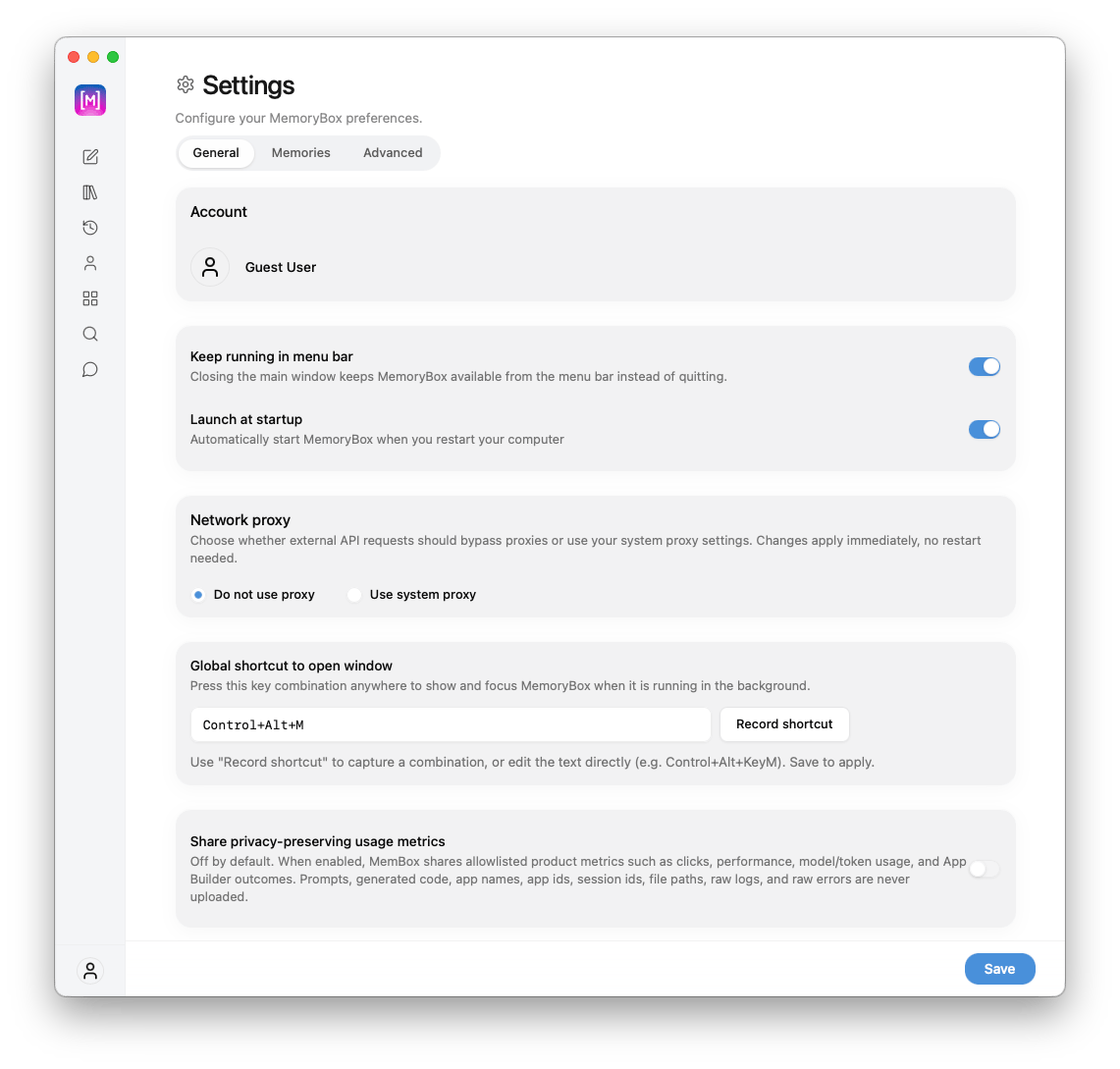
The **General** settings tab acts as the foundational layer for configuring how the MemoryBox client runs on your operating system. It manages your active profile state, global window management hotkeys, network proxies, metrics collection, and update delivery modes.
 ***
## 🖥️ Upper Control Parameters
The **Account** block at the top of the panel displays your current local configuration space data:
* **Identity Tracking:** Verifies your active profile session (e.g., `Guest User`). Confirming this profile ensures that your conversation histories, memory configurations, and space definitions are routing into the correct data engine.
These parameters dictate how the application processes background tasks, initializes on start, and bridges external network calls:
| Option | Functionality |
| :--------------------------- | :------------------------------------------------------------------------------------------------------------------------------------------------------------------------------------------------------------------------------------------------------------------------------------------------------------------------------------------------------------------ |
| **Keep running in menu bar** | When toggled on, closing the primary application window minimizes the interface down to your desktop's system menu bar/tray instead of executing a hard shutdown. |
| **Launch at startup** | Automates background initialization operations, launching the MemoryBox desktop core automatically whenever you restart your operating system. |
| **Network proxy** | Configures network routing environments for external AI API queries:
***
## 🖥️ Upper Control Parameters
The **Account** block at the top of the panel displays your current local configuration space data:
* **Identity Tracking:** Verifies your active profile session (e.g., `Guest User`). Confirming this profile ensures that your conversation histories, memory configurations, and space definitions are routing into the correct data engine.
These parameters dictate how the application processes background tasks, initializes on start, and bridges external network calls:
| Option | Functionality |
| :--------------------------- | :------------------------------------------------------------------------------------------------------------------------------------------------------------------------------------------------------------------------------------------------------------------------------------------------------------------------------------------------------------------ |
| **Keep running in menu bar** | When toggled on, closing the primary application window minimizes the interface down to your desktop's system menu bar/tray instead of executing a hard shutdown. |
| **Launch at startup** | Automates background initialization operations, launching the MemoryBox desktop core automatically whenever you restart your operating system. |
| **Network proxy** | Configures network routing environments for external AI API queries:
• **Do not use proxy:** Routes all data exchanges directly across standard internet gateways.
• **Use system proxy:** Instructs the app to query and extract your local desktop's network proxy layers. *Note: Proxy adjustments apply immediately; no client restart is required.* |
The **Global shortcut to open window** section registers an OS-wide keyboard pattern listener to bring the MemoryBox workspace viewport immediately into focus from the background:
* **Default Sequence:** Fresh installations baseline to `Control+Alt+M`.
* **Custom Configuration:** Click the **Record shortcut** button to register a unique key mapping sequence. You can also click and edit the input line manually using custom text syntax rules (e.g., `Control+Alt+KeyM`). Click **Save** to apply the layout modification rules.
***
 ***
## ⚙️ Lower Control Parameters
Fine-tune your local data transmission, diagnostic reporting limits, and analytics tracking optimization preferences:
| Privacy Toggle | System Rules & Definitions |
| :----------------------------------------- | :---------------------------------------------------------------------------------------------------------------------------------------------------------------------------------------------------------------------------------------------------------------------------------------------------------------------------------------------------------------------------------------------------------------------------------------------------- |
| **Share privacy-preserving usage metrics** | • **Toggled Off (Default):** Deactivates external event reporting.
***
## ⚙️ Lower Control Parameters
Fine-tune your local data transmission, diagnostic reporting limits, and analytics tracking optimization preferences:
| Privacy Toggle | System Rules & Definitions |
| :----------------------------------------- | :---------------------------------------------------------------------------------------------------------------------------------------------------------------------------------------------------------------------------------------------------------------------------------------------------------------------------------------------------------------------------------------------------------------------------------------------------- |
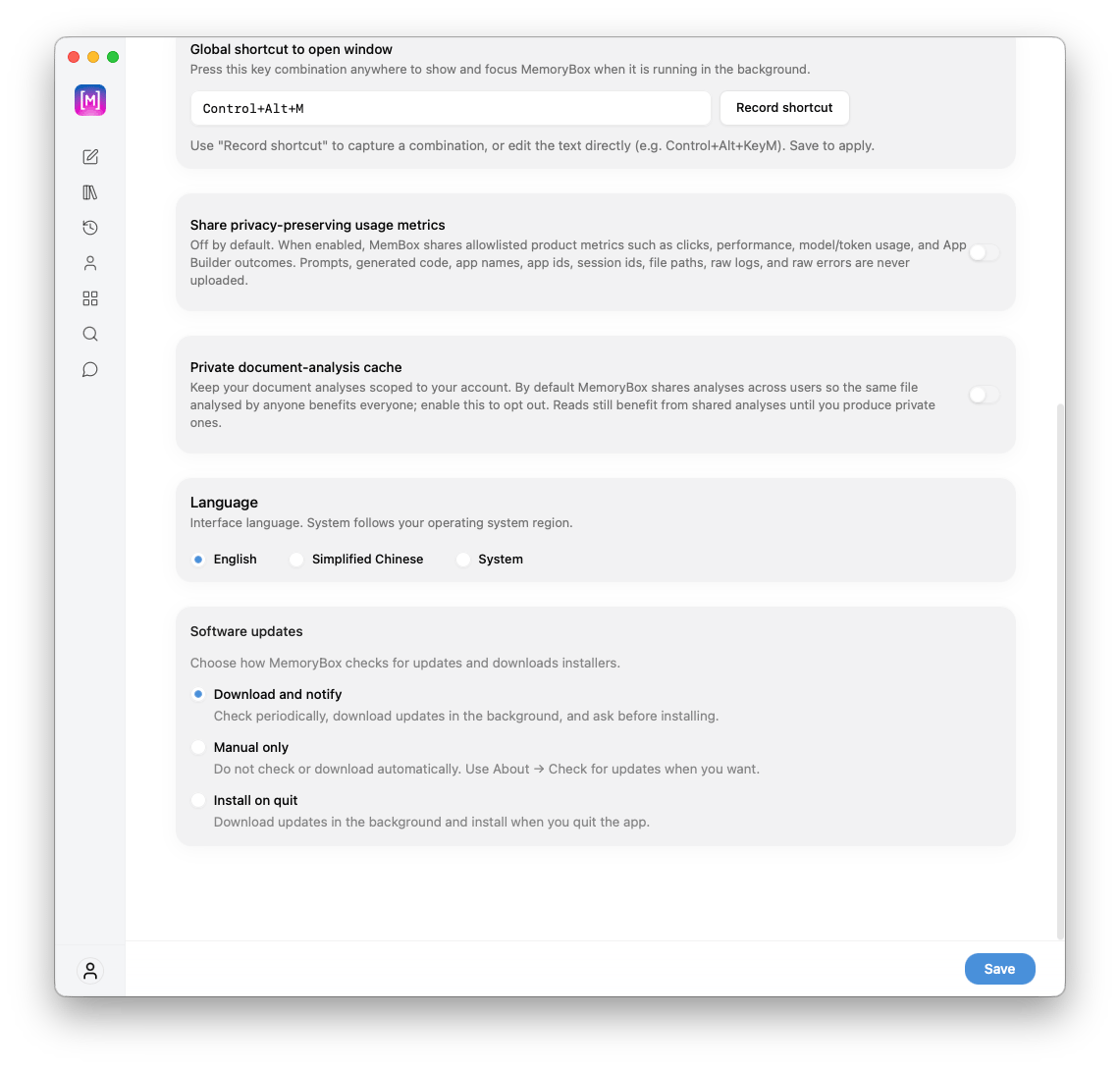
| **Share privacy-preserving usage metrics** | • **Toggled Off (Default):** Deactivates external event reporting.
• **Toggled On:** Shares allowlisted product usage metrics (e.g., clicks, application performance intervals, model/token usage arrays, and App Builder outcomes).
*Guardrail Notice: Prompts, generated code snippets, application names, app/session IDs, specific file paths, raw logs, and raw error stacks are completely excluded and never uploaded.* |
| **Private document-analysis cache** | • **Toggled Off (Default):** Shares anonymized structural document analysis signatures across users so that if a common file layout is analyzed by anyone, everyone benefits from reduced background processing latency.
• **Toggled On:** Scopes all file parsing data exclusively to your account profile to enforce strict localized file boundaries. Reads continue to benefit from shared entries until you generate unique private caches. |
The **Language** picker provides explicit radio modifiers to change user interface text string localizations throughout the client application interface:
* **English:** Locks the desktop vocabulary to the standard English language dictionary profile.
* **Simplified Chinese (简体中文):** Overwrites all text nodes to the translation string ledger.
* **System:** Forces the application layout elements to trace and dynamically match your operating system's native regional language settings.
The **Software updates** management section lets you designate how the system interfaces with deployment servers to track version updates and manage installers:
* **Download and notify (Default):** Periodically runs silent background version checking loops, fetches available updates automatically in the background, and prompts you for verification before running installers.
* **Manual only:** Completely halts background tracking, checking, and downloading architectures. To look for updates under this mode, you must explicitly trigger the checker via **About** $\rightarrow$ **Check for updates**.
* **Install on quit:** Downloads verified system upgrade files quietly in the background and applies them automatically when you close down the application workspace.
***
## 💾 Staging Configuration Changes
Adjustments made inside the General settings panels are applied dynamically to your active local runtime configurations only upon validation:
* **Commit Updates:** Select the blue **Save** button in the bottom-right dashboard layout margin to commit your choices directly to your local system configuration file.
* **Navigation Alert:** Changing focus to separate configuration tabs (`Memories` / `Advanced`) or navigating away via the primary sidebar toolbar panels prior to selecting Save will instantly drop your workspace modifications and restore the last saved state.