> ## Documentation Index
> Fetch the complete documentation index at: https://docs.memorybox.ai/llms.txt
> Use this file to discover all available pages before exploring further.
# Memories Settings
> Configure local directory file monitoring, storage vault parameters, and cloud sync destinations.
## Storage & Synchronization
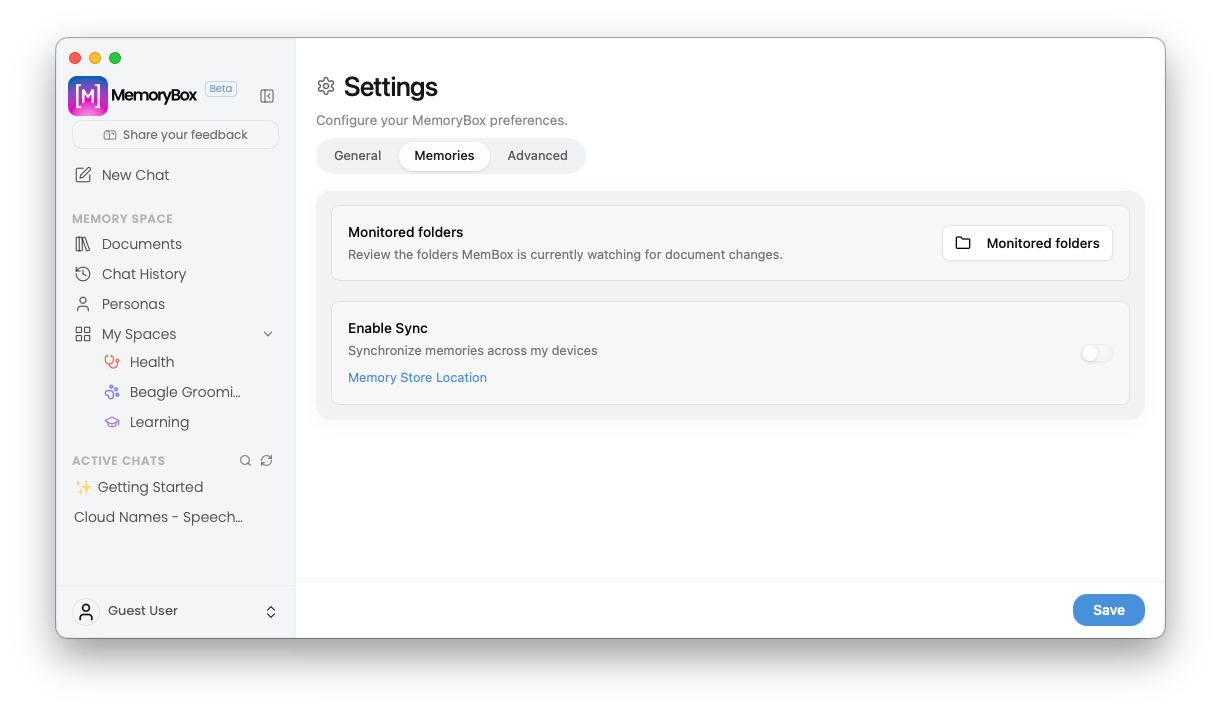
The **Memories** settings dashboard handles how information is localized, monitored, and synchronized across different external targets and hardware environments. Within this tab, you can manage the local directories the application watches for file modifications and establish cross-device cloud bridging configurations.
 ***
## 📁 Continuous File Monitoring
At the top of the pane sits the localized document ingestion management hub:
* **Monitored folders Action Button:** Click the **Monitored folders** button to launch a system directory manager modal. Here, you can review, add, or delete specific folder paths that MemoryBox continuously watches in the background for new file drop events or document modifications.
***
## 🔄 Memory Synchronization
The **Enable Sync** section bridges your locally indexed intelligence across multiple active client systems or secondary user profiles.
* **Memory Store Location Link:** Clicking this text link opens your operating system's native file explorer (Finder or File Explorer) directly to the root local directory where your primary SQLite database asset files reside.
### Conditional Menu Expansion
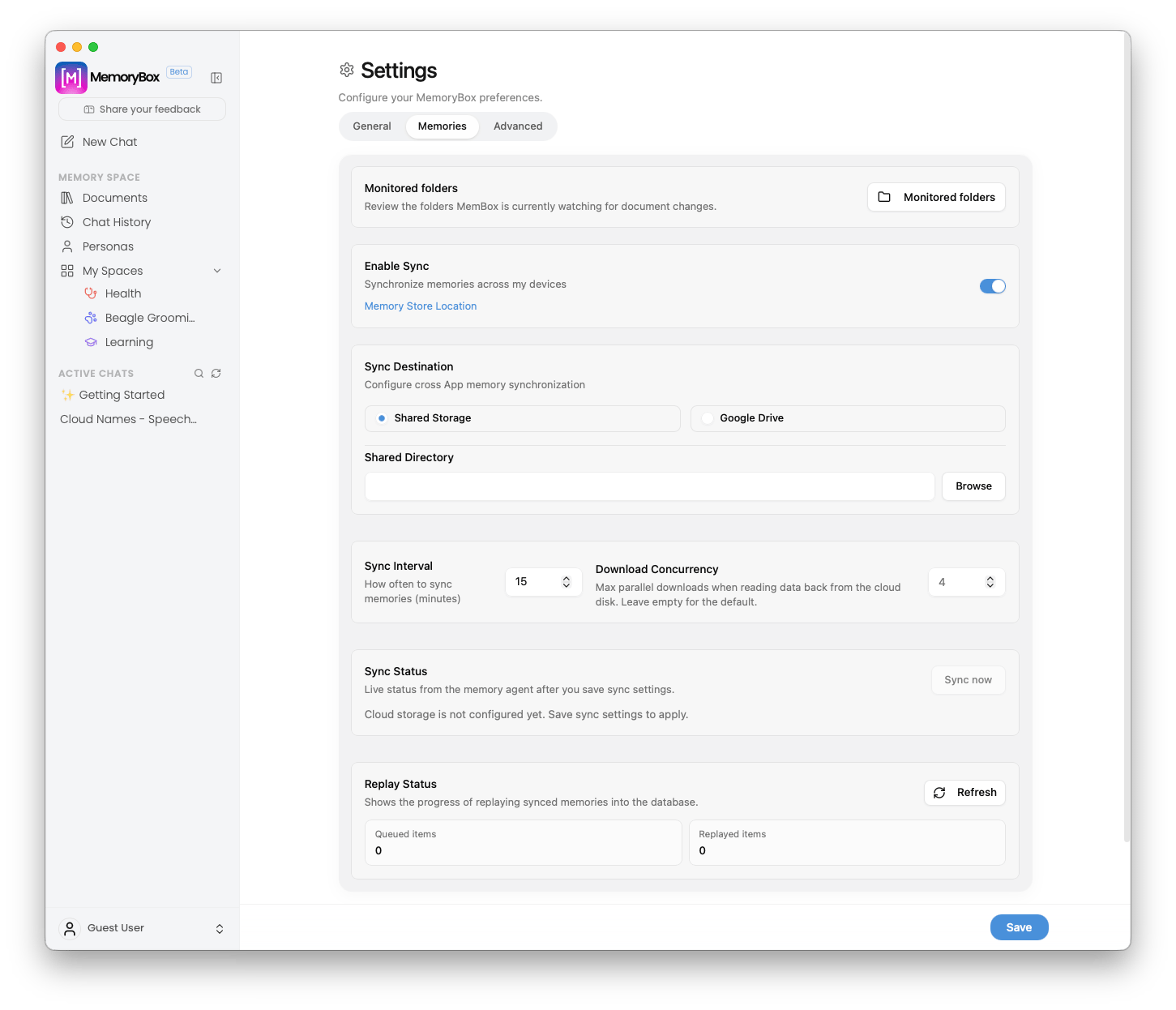
By default, sync configurations are collapsed to maintain a clean interface footprint. Activating the **Enable Sync** toggle switch dynamically expands the card frame downward to expose your advanced cloud pipeline preference matrices:
***
## 📁 Continuous File Monitoring
At the top of the pane sits the localized document ingestion management hub:
* **Monitored folders Action Button:** Click the **Monitored folders** button to launch a system directory manager modal. Here, you can review, add, or delete specific folder paths that MemoryBox continuously watches in the background for new file drop events or document modifications.
***
## 🔄 Memory Synchronization
The **Enable Sync** section bridges your locally indexed intelligence across multiple active client systems or secondary user profiles.
* **Memory Store Location Link:** Clicking this text link opens your operating system's native file explorer (Finder or File Explorer) directly to the root local directory where your primary SQLite database asset files reside.
### Conditional Menu Expansion
By default, sync configurations are collapsed to maintain a clean interface footprint. Activating the **Enable Sync** toggle switch dynamically expands the card frame downward to expose your advanced cloud pipeline preference matrices:
 | Configuration Option | Operational System Rules |
| :----------------------- | :------------------------------------------------------------------------------------------------------------------------------------------------------------------------------------------------------------------------------------------------------------------------------------------------------ |
| **Sync Destination** | Choose your primary network or cloud storage target platform:
| Configuration Option | Operational System Rules |
| :----------------------- | :------------------------------------------------------------------------------------------------------------------------------------------------------------------------------------------------------------------------------------------------------------------------------------------------------ |
| **Sync Destination** | Choose your primary network or cloud storage target platform:
• **Shared Storage:** Uses a local directory path to mirror data, ideal for custom cloud setups or offline environments.
• **Google Drive:** Direct secure authentication handshake to link your personal Google Cloud account. |
| **Shared Directory** | *Only available when Shared Storage is active.* Click **Browse** to define the target folder directory used to mirror and stream application updates. |
| **Sync Interval** | Adjust the automated polling frequency (in minutes) tracking how often the agent pings the storage link for fresh file changes. |
| **Download Concurrency** | Set the maximum parallel downloads allowed when reading knowledge structures back from your cloud disk. Leaving this blank defaults to `4` threads. |
| **Sync Status** | Displays live connection diagnostic text. Click **Sync now** to force an immediate, manual data synchronization cycle across the active endpoint. |
***
**Unsaved Sync Parameters:** You must manually click the blue **Save** button in the bottom-right margin of the application workspace window to write your synchronization updates or directory modifications to your active runtime file loop.