> ## Documentation Index
> Fetch the complete documentation index at: https://docs.memorybox.ai/llms.txt
> Use this file to discover all available pages before exploring further.
# Browser Extension
> Configure your background web companion to automatically archive cloud-based AI sessions into your local database.
## Your Personal Assistant
The MemoryBox Browser Extension serves as a background pipeline that travels with you across the web. It automatically captures, structures, and transmits your interactions with cloud-hosted platforms directly into your private, local memory store.
***
## 🔮 The Hover Orb Control Center
When visiting supported generative AI platforms, a persistent floating **MemoryBox Orb** populates on the right margin of your screen.
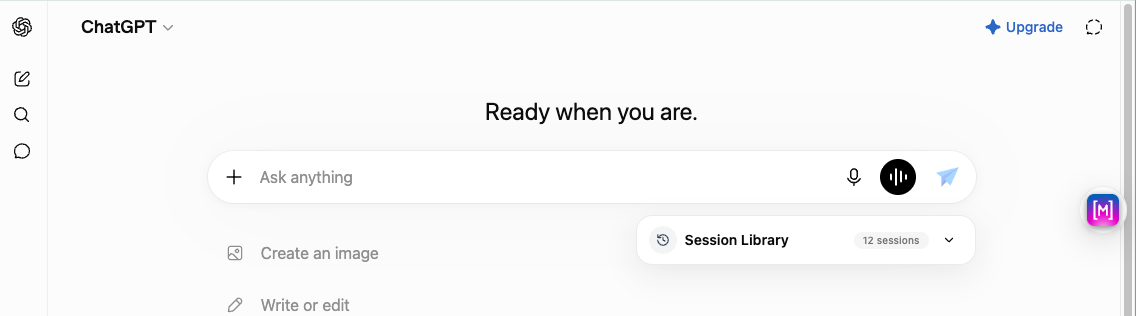 Clicking the floating orb icon opens an interactive quick-access control card. This card allows you to establish synchronization rules for the open web session without navigating away from your thread:
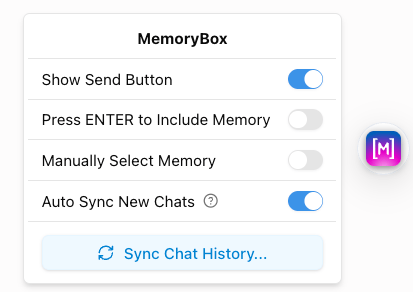 * **Auto Sync New Chats:** When enabled, fresh conversation instances initiated on the target web platform are automatically captured and sent to your local storage.
* **Auto Sync Opened History:** Dictates whether the extension should parse and sync older historical logs that you pull open within your web browser.
* **Sync Chat History... Trigger:** A quick-action button used to initialize a comprehensive, multi-session data import sequence.
### 🔄 Executing a Comprehensive Chat History Sync
Selecting **Sync Chat History...** from the Orb popover initializes a background scanning pipeline to mass-import your past historical records:
#### 1. The Sync Manifest Checklist
The extension reveals a multi-selection manifest panel to let you curate exactly which past threads get archived into your local engine:
* **Auto Sync New Chats:** When enabled, fresh conversation instances initiated on the target web platform are automatically captured and sent to your local storage.
* **Auto Sync Opened History:** Dictates whether the extension should parse and sync older historical logs that you pull open within your web browser.
* **Sync Chat History... Trigger:** A quick-action button used to initialize a comprehensive, multi-session data import sequence.
### 🔄 Executing a Comprehensive Chat History Sync
Selecting **Sync Chat History...** from the Orb popover initializes a background scanning pipeline to mass-import your past historical records:
#### 1. The Sync Manifest Checklist
The extension reveals a multi-selection manifest panel to let you curate exactly which past threads get archived into your local engine:
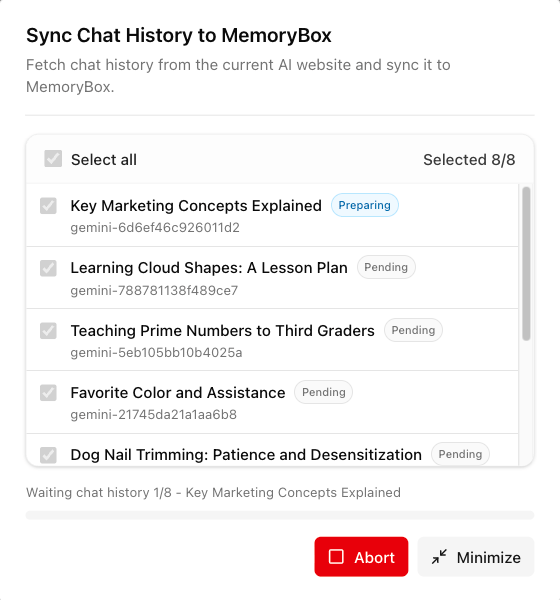 * **Select all:** A bulk master checkbox with an active thread selection counter (e.g., `Selected 10/10`).
* **Thread Identifiers:** Thread title strings mapped to explicit unique local platform hashes (e.g., `gemini-f450e158...`).
* **Live Status Chips:** Contextual indicators showing whether an individual conversation is **Pending**, **Preparing**, or actively marked as **Done**.
* **Inline Action Anchors:** Use the primary **Abort** button to halt the pipeline or **Minimize** to reduce the layout progress interface.
#### 2. Minimized Background Execution Layout
Clicking **Minimize** cleanly shrinks the data layout down into a non-intrusive floating progress window. This allows you to monitor background transmission states while continuing your web workflows uninterrupted:
* **Select all:** A bulk master checkbox with an active thread selection counter (e.g., `Selected 10/10`).
* **Thread Identifiers:** Thread title strings mapped to explicit unique local platform hashes (e.g., `gemini-f450e158...`).
* **Live Status Chips:** Contextual indicators showing whether an individual conversation is **Pending**, **Preparing**, or actively marked as **Done**.
* **Inline Action Anchors:** Use the primary **Abort** button to halt the pipeline or **Minimize** to reduce the layout progress interface.
#### 2. Minimized Background Execution Layout
Clicking **Minimize** cleanly shrinks the data layout down into a non-intrusive floating progress window. This allows you to monitor background transmission states while continuing your web workflows uninterrupted:
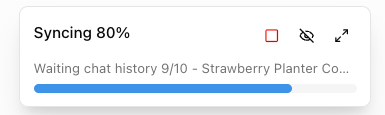 **Background Execution Guard:** The data ingest pipeline runs entirely within the context of your active browser session. Ensure you keep the application tab active until the progress rule registers completion.
***
## ⚙️ Primary Popup Configuration
Clicking the pinned **MemoryBox logo icon** in your browser's top system tray reveals your primary environment preferences, extension versions, and connection state cards.
**Background Execution Guard:** The data ingest pipeline runs entirely within the context of your active browser session. Ensure you keep the application tab active until the progress rule registers completion.
***
## ⚙️ Primary Popup Configuration
Clicking the pinned **MemoryBox logo icon** in your browser's top system tray reveals your primary environment preferences, extension versions, and connection state cards.
 ### Standard Settings Elements
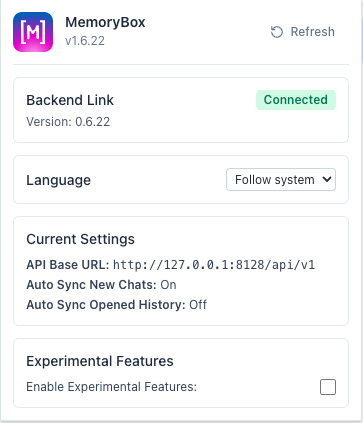
* **Backend Link Indicator:** Displays a live connection status badge (e.g., `Connected`) alongside the current operational extension build version.
* **Language Dropdown:** Forces the extension UI elements to adapt to your preferred locale. Options include **Follow system**, **English**, and **简体中文** (Simplified Chinese).
### Standard Settings Elements
* **Backend Link Indicator:** Displays a live connection status badge (e.g., `Connected`) alongside the current operational extension build version.
* **Language Dropdown:** Forces the extension UI elements to adapt to your preferred locale. Options include **Follow system**, **English**, and **简体中文** (Simplified Chinese).
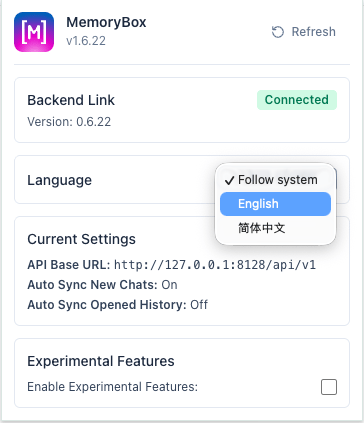 * **Current Settings Overview:** Displays a read-only telemetry block tracking your operational parameters:
* **API Base URL:** The active target network socket used to bridge data (`http://127.0.0.1:8128/api/v1`).
* **Auto Sync New Chats Status:** Reflects the active boolean condition toggle from your hover orb.
* **Auto Sync Opened History Status:** Reflects the historical ingestion state toggle.
***
## 🧪 Experimental Features
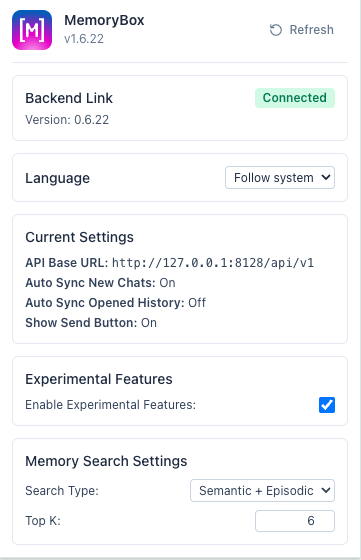
Checking the box next to **Enable Experimental Features** inside the default extension system tray card unlocks specialized, pre-release UI injections and control systems for early testing.
* **Current Settings Overview:** Displays a read-only telemetry block tracking your operational parameters:
* **API Base URL:** The active target network socket used to bridge data (`http://127.0.0.1:8128/api/v1`).
* **Auto Sync New Chats Status:** Reflects the active boolean condition toggle from your hover orb.
* **Auto Sync Opened History Status:** Reflects the historical ingestion state toggle.
***
## 🧪 Experimental Features
Checking the box next to **Enable Experimental Features** inside the default extension system tray card unlocks specialized, pre-release UI injections and control systems for early testing.
 ### Advanced Orb Toggles
Activating this mode modifies your floating workspace environment. Clicking the browser hover orb now expands the control interface to surface advanced parameters:
### Advanced Orb Toggles
Activating this mode modifies your floating workspace environment. Clicking the browser hover orb now expands the control interface to surface advanced parameters:
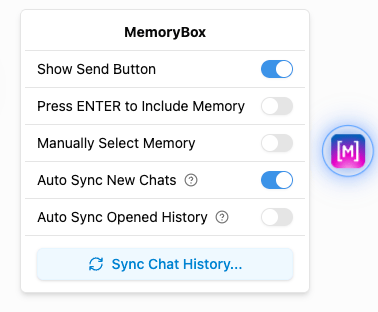 * **Show Send Button (PaperPlane Icon):** Appends a dedicated manual submission icon alongside the native input text field on **ChatGPT and Gemini** web apps. This allows you to explicitly manage and intercept prompt stream routing parameters.
* **Press ENTER to Include Memory:** Adjusts form submission settings, letting you load localized historical contexts instantly with standard keyboard shortcuts.
* **Manually Select Memory:** Bypasses automatic algorithmic ingestion heuristics, prompting you to curate individual inputs row by row.
### 🎞️ The Inline Session Library (ChatGPT Exclusive)
When experimental features are active, the extension injects a native, interactive **Session Library** panel directly beneath the primary message input field on the **ChatGPT** website. This widget lets you search and reference your local database assets directly within the browser window.
* **Show Send Button (PaperPlane Icon):** Appends a dedicated manual submission icon alongside the native input text field on **ChatGPT and Gemini** web apps. This allows you to explicitly manage and intercept prompt stream routing parameters.
* **Press ENTER to Include Memory:** Adjusts form submission settings, letting you load localized historical contexts instantly with standard keyboard shortcuts.
* **Manually Select Memory:** Bypasses automatic algorithmic ingestion heuristics, prompting you to curate individual inputs row by row.
### 🎞️ The Inline Session Library (ChatGPT Exclusive)
When experimental features are active, the extension injects a native, interactive **Session Library** panel directly beneath the primary message input field on the **ChatGPT** website. This widget lets you search and reference your local database assets directly within the browser window.
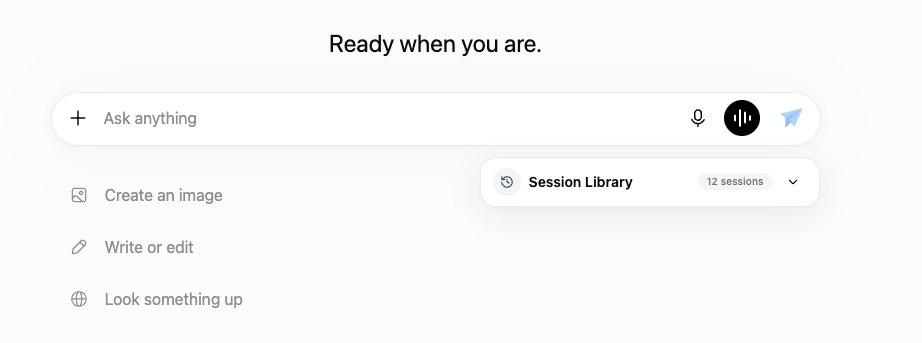 Clicking the right-hand dropdown caret opens the panel to display a detailed chronological registry of your local knowledge assets:
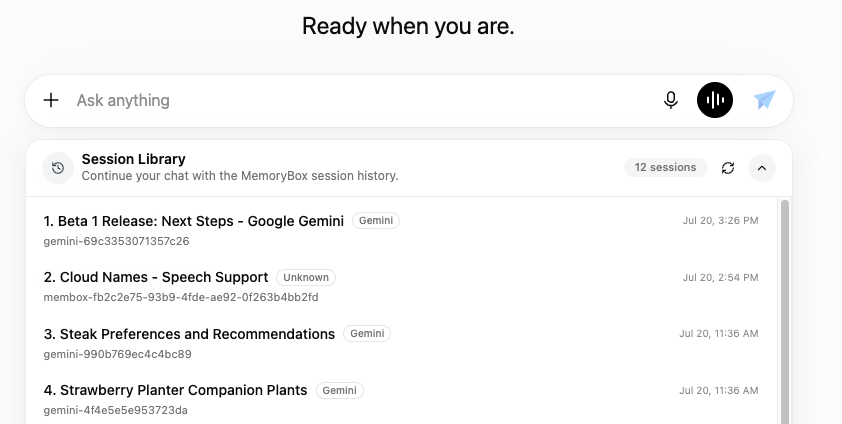 #### Session Item Architecture
1. **Context/Title Summary:** Displays the main title or starting prompt text of the archived chat record.
2. **Space Target Badge:** Highlights the designated **Memory Space** the session is currently bound to (renders as `Unknown` if the session is sitting in your unassigned global repository).
3. **Historical Timestamp:** Displays the localized exact date and time the data exchange was originally logged.
4. **Unique Memory ID:** Exposes the raw application hash string (e.g., `membox-83cb3ee1...`) for explicit developer debugging or local directory mapping.
5. **Panel Controls:** The header toolbar provides a **Refresh icon** to pull down newly synced records from the local desktop core on demand and an up-caret to collapse the component framework.
***
**How Your Data Flows:**
MemoryBox keeps your information private by saving your synced chats directly onto your own computer's hard drive. The only time the extension connects to the internet is when you ask it to import your past history—it has to securely reach out to the cloud (like OpenAI or Google) to pull down your old conversations so it can save them safely into your local workspace.
***
With your browser companion active, proceed to configure your local desktop core preferences, memory locations, and advanced model matrices.
#### Session Item Architecture
1. **Context/Title Summary:** Displays the main title or starting prompt text of the archived chat record.
2. **Space Target Badge:** Highlights the designated **Memory Space** the session is currently bound to (renders as `Unknown` if the session is sitting in your unassigned global repository).
3. **Historical Timestamp:** Displays the localized exact date and time the data exchange was originally logged.
4. **Unique Memory ID:** Exposes the raw application hash string (e.g., `membox-83cb3ee1...`) for explicit developer debugging or local directory mapping.
5. **Panel Controls:** The header toolbar provides a **Refresh icon** to pull down newly synced records from the local desktop core on demand and an up-caret to collapse the component framework.
***
**How Your Data Flows:**
MemoryBox keeps your information private by saving your synced chats directly onto your own computer's hard drive. The only time the extension connects to the internet is when you ask it to import your past history—it has to securely reach out to the cloud (like OpenAI or Google) to pull down your old conversations so it can save them safely into your local workspace.
***
With your browser companion active, proceed to configure your local desktop core preferences, memory locations, and advanced model matrices.