> ## Documentation Index
> Fetch the complete documentation index at: https://docs.memorybox.ai/llms.txt
> Use this file to discover all available pages before exploring further.
# Documents
> Ingest, organize, and manage files within the local contextual curation engine.
## The Ingestion Phase
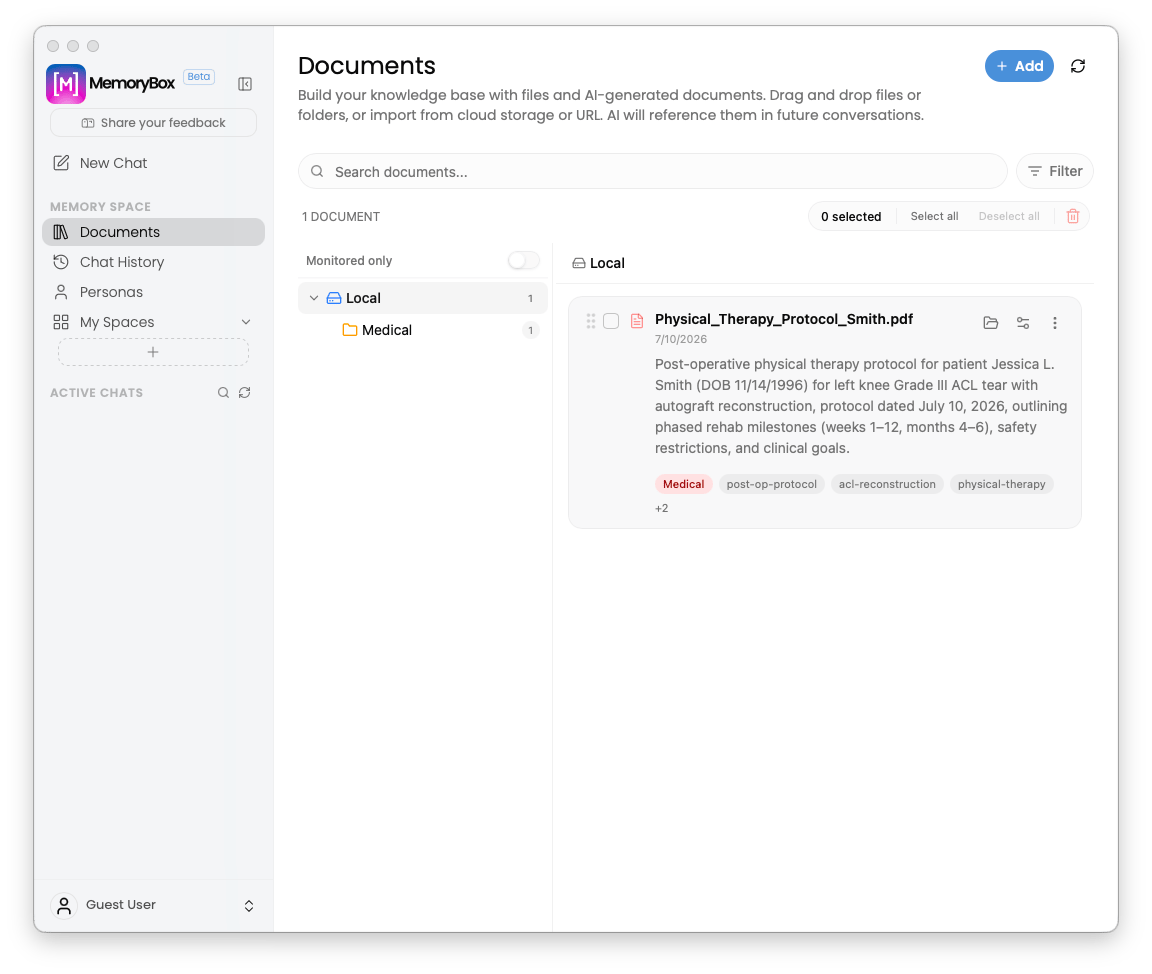
The **Documents** panel serves as a centralized, localized repository for user-generated assets, document attachments, and external data sources. Instead of managing disjointed conversational files, this module functions as an integrated split-pane layout that feeds content directly into your local vector space to anchor downstream agent reasoning.
 ***
## 📥 Ingesting New Assets
Clicking the **`+ Add`** button in the top-right corner exposes five distinct data integration workflows tailored to how you manage information:
***
## 📥 Ingesting New Assets
Clicking the **`+ Add`** button in the top-right corner exposes five distinct data integration workflows tailored to how you manage information:
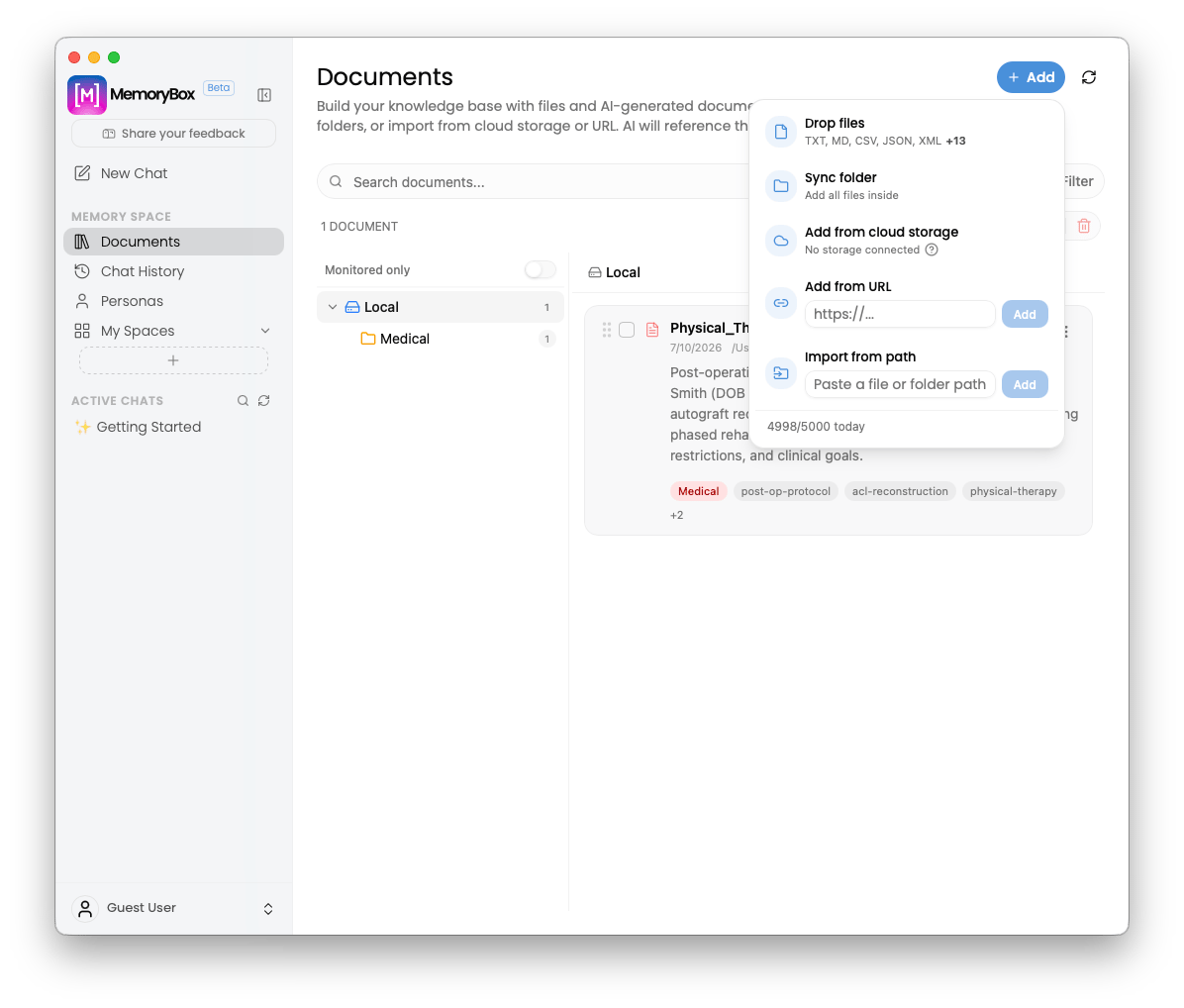 * **Drop files:** Drag and drop flat files directly into the UI (supports `TXT`, `MD`, `CSV`, `JSON`, `XML`, and more).
* **Sync folder:** Connect and monitor whole directories, importing all internal assets simultaneously.
* **Add from cloud storage:** Connect third-party cloud files directly to your knowledge base (displays connection health states).
* **Add from URL:** Provide a web link (`https://...`) to scrape and clean online text content into local vector structures.
* **Import from path:** Directly paste an absolute path string from your host machine file system to pull the target asset into the vault.
* **Daily Ingestion Tracker:** Monitor your remaining host computing resources via the rolling volume limit indicator (e.g., `4999/5000 today`) at the bottom of the menu.
***
## 📂 Interface Layout Architecture
The interface uses a two-column split structure to organize massive data sets without visual clutter:
### 1. Left-Pane Folder Tree Navigation
* **Monitored Only Toggle:** Filter your entire list instantly to focus strictly on automated background directory watch folders.
* **Directory Nesting:** Navigate structural hierarchies (such as `Local > Medical`) accompanied by numeric badges counting the exact number of files stored inside that sector.
### 2. Right-Pane Document Cards
Individual files are surfaced as robust interactive asset cards detailing automated extraction parsing summaries:
* **Checkbox Selection:** Check individual card bubbles to trigger global batch tools like the **Trash** icon for bulk asset pruning.
* **Metadata Footprint:** View the ingestion date alongside the absolute source pathway (e.g., `/Users/.../Desktop/Medical`).
* **Text Extraction Snippet:** Review an inline preview of the parsed data stream (e.g., OCR or text segments extracted by the core engine) to verify index legibility.
* **Categorical Smart Badges:** Color-coded keyword and collection indicators (e.g., `Medical`, `mri-right-knee`, `acl-grade-iii`) are automatically bound to the asset card for rapid visual querying.
***
## ⚙️ Card-Level Target Actions
Each document card exposes standard layout tools in its upper-right margin to modify configuration parameters or open source nodes:
* **Move to Folder / Space (Folder Icon):** Remap the structural position of the file across your active storage paths.
* **Line Graph Utility Icon:** Inspect granular data generation points, query metrics, or specific vector chunk structures.
* **Vertical-Dots Options Menu:** Access system functions to copy file data, trigger manual re-indexing loops, or completely purge the document from your local machine.
**Dynamic Artifact Tracking:** Files generated by your chat sessions (PDFs, spreadsheets, images) support per-session custom output paths. If you move or rename these sessions, the underlying platform dynamically relocates the assets and re-indexes their paths automatically—ensuring your local document links never break.
***
Now that your core documents are accounted for, proceed to configure and audit your timeline logs inside the Chat History panel.
* **Drop files:** Drag and drop flat files directly into the UI (supports `TXT`, `MD`, `CSV`, `JSON`, `XML`, and more).
* **Sync folder:** Connect and monitor whole directories, importing all internal assets simultaneously.
* **Add from cloud storage:** Connect third-party cloud files directly to your knowledge base (displays connection health states).
* **Add from URL:** Provide a web link (`https://...`) to scrape and clean online text content into local vector structures.
* **Import from path:** Directly paste an absolute path string from your host machine file system to pull the target asset into the vault.
* **Daily Ingestion Tracker:** Monitor your remaining host computing resources via the rolling volume limit indicator (e.g., `4999/5000 today`) at the bottom of the menu.
***
## 📂 Interface Layout Architecture
The interface uses a two-column split structure to organize massive data sets without visual clutter:
### 1. Left-Pane Folder Tree Navigation
* **Monitored Only Toggle:** Filter your entire list instantly to focus strictly on automated background directory watch folders.
* **Directory Nesting:** Navigate structural hierarchies (such as `Local > Medical`) accompanied by numeric badges counting the exact number of files stored inside that sector.
### 2. Right-Pane Document Cards
Individual files are surfaced as robust interactive asset cards detailing automated extraction parsing summaries:
* **Checkbox Selection:** Check individual card bubbles to trigger global batch tools like the **Trash** icon for bulk asset pruning.
* **Metadata Footprint:** View the ingestion date alongside the absolute source pathway (e.g., `/Users/.../Desktop/Medical`).
* **Text Extraction Snippet:** Review an inline preview of the parsed data stream (e.g., OCR or text segments extracted by the core engine) to verify index legibility.
* **Categorical Smart Badges:** Color-coded keyword and collection indicators (e.g., `Medical`, `mri-right-knee`, `acl-grade-iii`) are automatically bound to the asset card for rapid visual querying.
***
## ⚙️ Card-Level Target Actions
Each document card exposes standard layout tools in its upper-right margin to modify configuration parameters or open source nodes:
* **Move to Folder / Space (Folder Icon):** Remap the structural position of the file across your active storage paths.
* **Line Graph Utility Icon:** Inspect granular data generation points, query metrics, or specific vector chunk structures.
* **Vertical-Dots Options Menu:** Access system functions to copy file data, trigger manual re-indexing loops, or completely purge the document from your local machine.
**Dynamic Artifact Tracking:** Files generated by your chat sessions (PDFs, spreadsheets, images) support per-session custom output paths. If you move or rename these sessions, the underlying platform dynamically relocates the assets and re-indexes their paths automatically—ensuring your local document links never break.
***
Now that your core documents are accounted for, proceed to configure and audit your timeline logs inside the Chat History panel.