> ## Documentation Index
> Fetch the complete documentation index at: https://docs.memorybox.ai/llms.txt
> Use this file to discover all available pages before exploring further.
# Personas
> Configure behavioral constraints, instruction boundaries, and automated routing profiles.
## Behavioral Isolation
A **Persona** represents an isolated behavioral profile, style convention, and rule framework that constrains your active conversations. By establishing distinct archetype profiles, you prevent instruction mixing or conversational context contamination across your localized projects.
When a Persona is assigned to a workspace thread, the underlying engine dynamically spins up customized **extractor, augment, and read skills** tailored to that profile's specific rule configurations.
***
## 👤 The Personas Dashboard
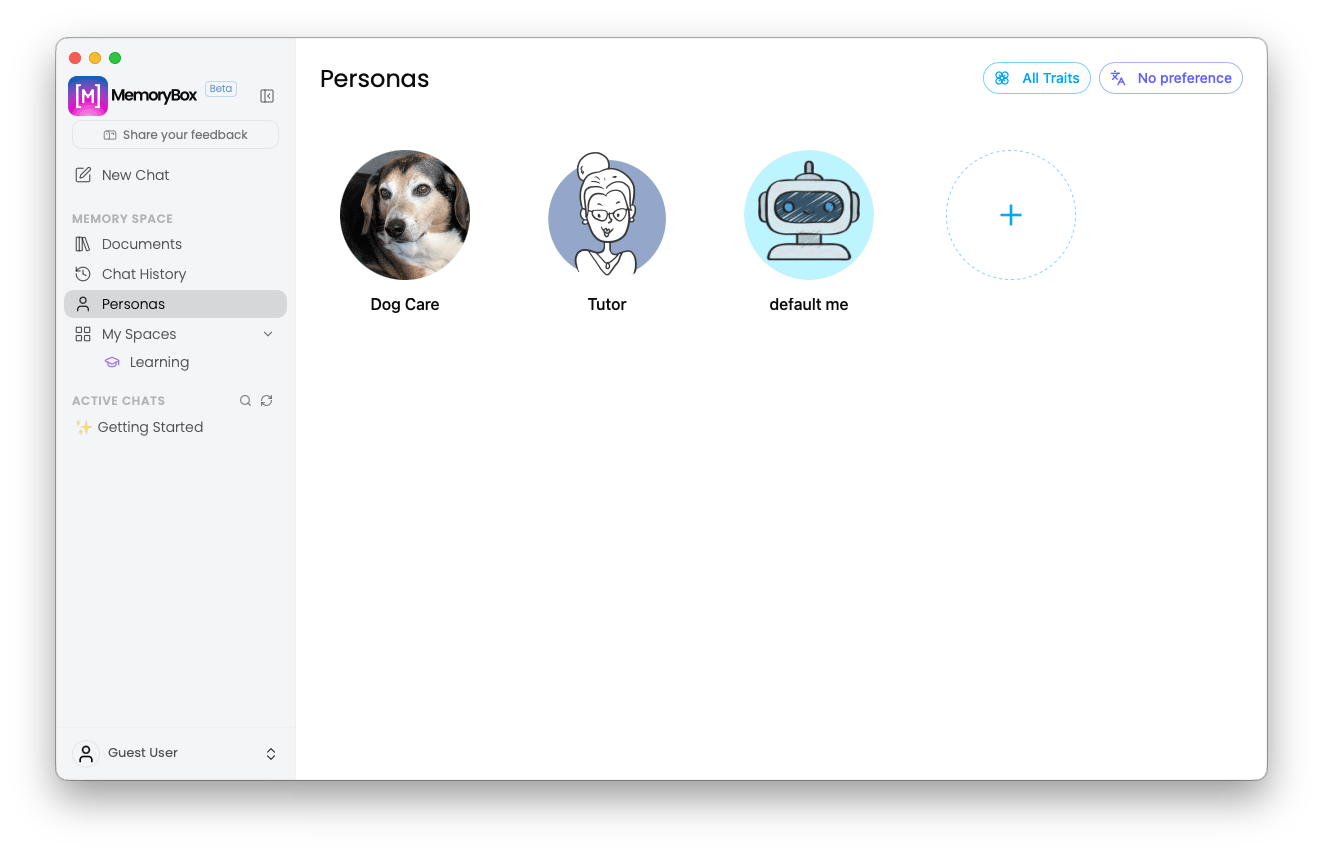
The **Personas** main view lists all active behavioral profiles configured on your local machine.
 ### Default Elements
* **Active Profile Grid:** View pre-configured default archetypes or custom profiles you have initialized.
* **Creation Trigger:** Clicking the clear **"+ Create Persona"** card initializes the isolated creation sequence.
***
## 🛠️ Initializing a New Persona
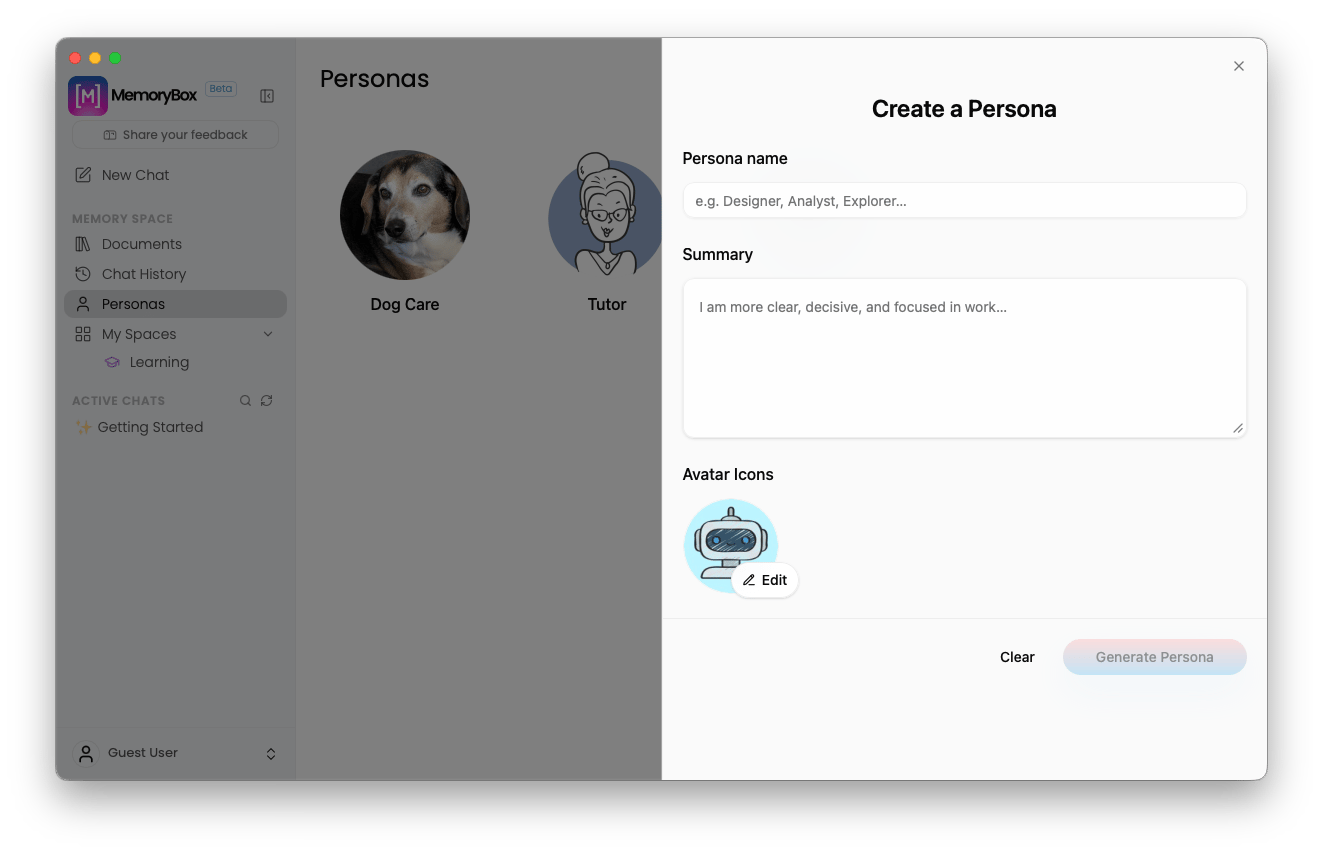
When creating or modifying a profile, the system provides an explicit text-field parameters card to dictate reasoning constraints.
### Default Elements
* **Active Profile Grid:** View pre-configured default archetypes or custom profiles you have initialized.
* **Creation Trigger:** Clicking the clear **"+ Create Persona"** card initializes the isolated creation sequence.
***
## 🛠️ Initializing a New Persona
When creating or modifying a profile, the system provides an explicit text-field parameters card to dictate reasoning constraints.
 ### System Configuration Inputs
1. **Name:** Declare an explicit string name representing the operational role (e.g., *Technical Architect, Data Analyst, Content Strategist*).
2. **Summary:** Input the raw procedural guidelines, background criteria, and performance parameters the AI model must follow. This field directly informs the system's dynamic prompt engineering pipeline, which distills your instructions into structured, layered prompt templates that govern the model's reasoning processes.
3. **Avatar:** Select a visual badge to represent the profile across the interface and connected endpoints
***
## 🎨 Avatar Personalization Matrix
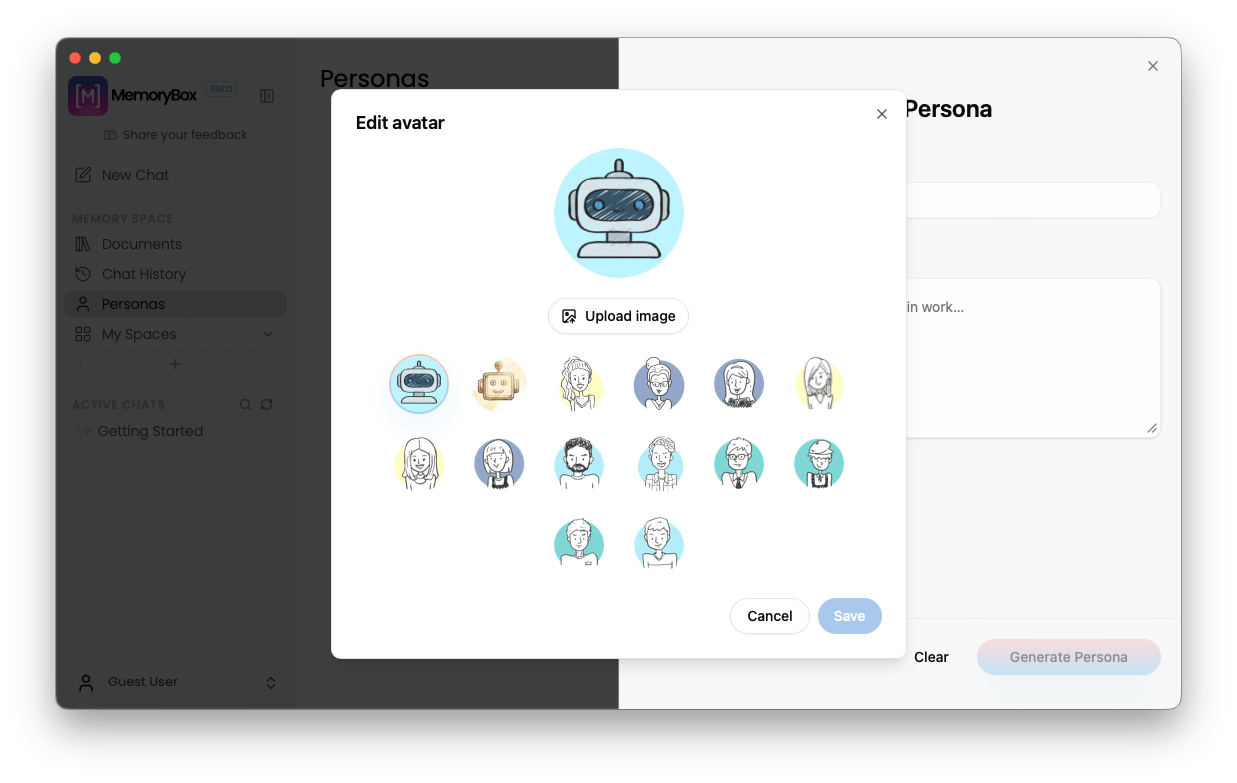
Clicking the avatar profile icon inside the creation panel opens an overlay modal to select or modify visual indicators for your profile card.
### System Configuration Inputs
1. **Name:** Declare an explicit string name representing the operational role (e.g., *Technical Architect, Data Analyst, Content Strategist*).
2. **Summary:** Input the raw procedural guidelines, background criteria, and performance parameters the AI model must follow. This field directly informs the system's dynamic prompt engineering pipeline, which distills your instructions into structured, layered prompt templates that govern the model's reasoning processes.
3. **Avatar:** Select a visual badge to represent the profile across the interface and connected endpoints
***
## 🎨 Avatar Personalization Matrix
Clicking the avatar profile icon inside the creation panel opens an overlay modal to select or modify visual indicators for your profile card.
 ***
## 📊 Core Behavioral Traits Matrix
As you interact with the platform, the system maps your global traits against a foundational matrix. These traits are evaluated globally across your local environment, offering an automated discovery layer with specialized confidence scores to track, refine, or sideline your professional defaults.
***
## 📊 Core Behavioral Traits Matrix
As you interact with the platform, the system maps your global traits against a foundational matrix. These traits are evaluated globally across your local environment, offering an automated discovery layer with specialized confidence scores to track, refine, or sideline your professional defaults.
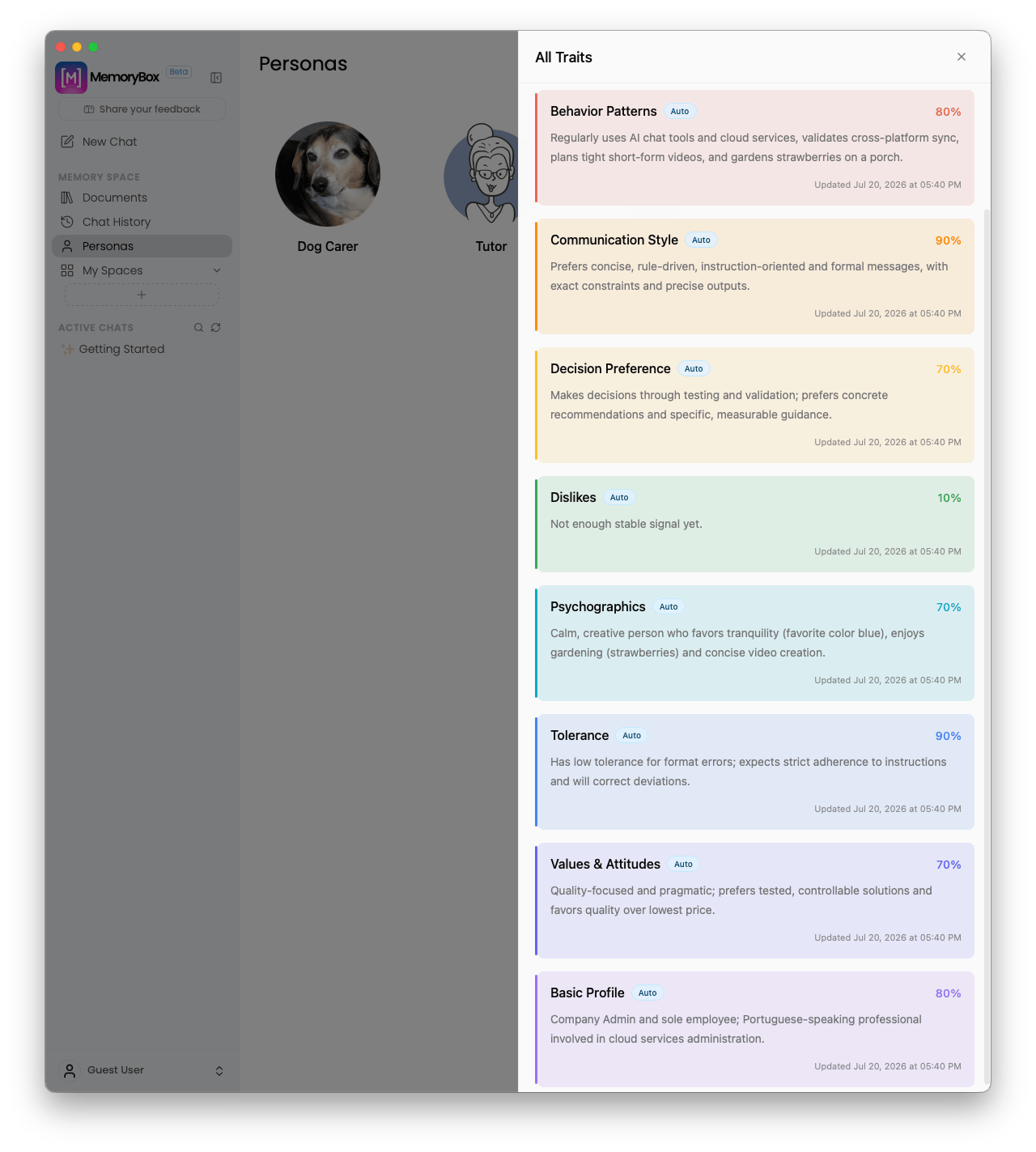 If desired, you can manually pin specific traits to your profile configuration to enforce hard guardrails or explicit performance priorities for the model.
The platform actively categorizes these eight parameters to ensure a continuous, deeply personalized agent interface:
| Category Name | Technical System Definition |
| :---------------------- | :----------------------------------------------------------------------------------------------------------------------------------------------------- |
| **Basic Profile** | Maps the user's primary professional identity, foundational domain expertise, and core operational focus area. |
| **Behavior Patterns** | Records localized application usage trends, preferred computing environments, and specific workflow cadences. |
| **Communication Style** | Tracks structural formatting choices, preferred vocabulary density, conversational length constraints, and delivery style preferences. |
| **Decision Preference** | Identifies the core analytical priorities—such as speed, data-driven comparisons, structural quality, or cautious steps—directing user choices. |
| **Dislikes** | Establishes hard guardrails and structural restrictions to ensure the model actively avoids undesirable styling, tones, or problem-solving approaches. |
| **Psychographics** | Analyzes the underlying approach to tasks, cognitive styles, creative interests, and preferred tones governing user-initiated work. |
| **Tolerance** | Evaluates the user's openness to risk, technical detail, system complexity, and raw output ambiguity before applying structured formatting. |
| **Values & Attitudes** | Distills core system values, architectural stances, and product deployment methodologies favored by the user. |
**Local Store Enforcement:** All calculations, discovered confidence scores, and profile configurations remain stored in your local **Memory Store Location**, maintaining absolute security and sovereign control over your behavioral parameters.
***
With your behavioral personas and traits initialized, proceed to partition your local data assets and profiles into project-specific workflow environments.
If desired, you can manually pin specific traits to your profile configuration to enforce hard guardrails or explicit performance priorities for the model.
The platform actively categorizes these eight parameters to ensure a continuous, deeply personalized agent interface:
| Category Name | Technical System Definition |
| :---------------------- | :----------------------------------------------------------------------------------------------------------------------------------------------------- |
| **Basic Profile** | Maps the user's primary professional identity, foundational domain expertise, and core operational focus area. |
| **Behavior Patterns** | Records localized application usage trends, preferred computing environments, and specific workflow cadences. |
| **Communication Style** | Tracks structural formatting choices, preferred vocabulary density, conversational length constraints, and delivery style preferences. |
| **Decision Preference** | Identifies the core analytical priorities—such as speed, data-driven comparisons, structural quality, or cautious steps—directing user choices. |
| **Dislikes** | Establishes hard guardrails and structural restrictions to ensure the model actively avoids undesirable styling, tones, or problem-solving approaches. |
| **Psychographics** | Analyzes the underlying approach to tasks, cognitive styles, creative interests, and preferred tones governing user-initiated work. |
| **Tolerance** | Evaluates the user's openness to risk, technical detail, system complexity, and raw output ambiguity before applying structured formatting. |
| **Values & Attitudes** | Distills core system values, architectural stances, and product deployment methodologies favored by the user. |
**Local Store Enforcement:** All calculations, discovered confidence scores, and profile configurations remain stored in your local **Memory Store Location**, maintaining absolute security and sovereign control over your behavioral parameters.
***
With your behavioral personas and traits initialized, proceed to partition your local data assets and profiles into project-specific workflow environments.