
Your Personal Assistant
The MemoryBox Browser Extension travels with you across the web. It automatically captures, structures, and transmits your AI interactions directly into your private, local memory store.🔮 The Hover Orb Control Center
When visiting supported generative AI platforms, a persistent floating MemoryBox Orb appears on the right margin of your screen.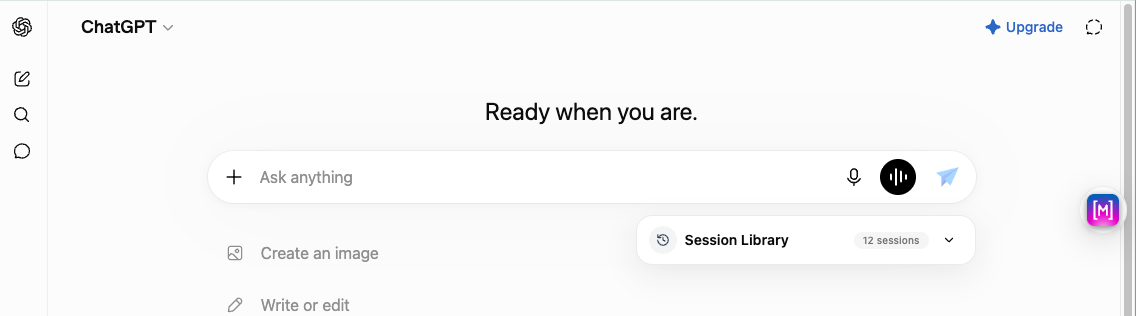
The floating tracking orb injected inline alongside web-based chat interfaces.
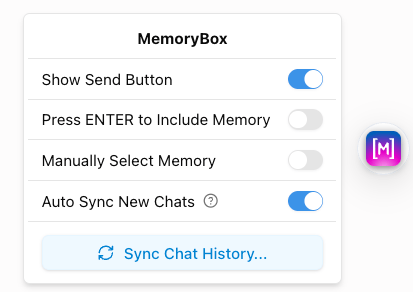
The standard quick-sync control panel revealed by selecting the web workspace orb.
- Auto Sync New Chats: Captures and sends fresh conversation instances directly to local storage.
- Auto Sync Opened History: Parses and syncs older historical logs as you pull them open in your browser.
- Sync Chat History… Trigger: Starts a multi-session data import sequence.
🔄 Executing a Comprehensive Chat History Sync
Selecting Sync Chat History… from the Orb popover initializes a background scanning pipeline to mass-import your past historical records:1. The Sync Manifest Checklist
The extension reveals a multi-selection manifest panel to let you curate exactly which past threads get archived: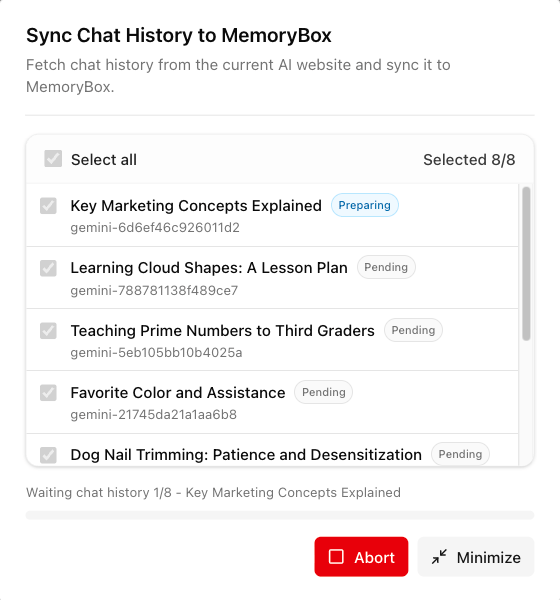
The extension selection manifest tracking available historical chat threads and current processing steps.
- Select all: Master checkbox with an active thread selection counter (e.g.,
Selected 10/10). - Thread Identifiers: Thread titles mapped to explicit local platform hashes (e.g.,
gemini-f450e158...). - Live Status Chips: Real-time indicators showing whether a conversation is Pending, Preparing, or Done.
- Inline Action Anchors: Use Abort to halt the pipeline or Minimize to reduce the layout interface.
2. Minimized Background Execution Layout
Clicking Minimize shrinks the data layout into a non-intrusive floating progress window, letting you work uninterrupted: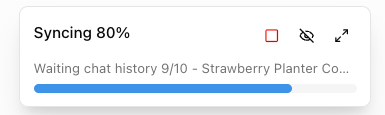
The minimized progress floating console tracking background conversation ingest workflows.
🥞 Supported LLM Platforms
MemoryBox adapts automatically to the underlying design and API structure of each platform. Synchronization happens behind the scenes using two simple execution modes:Direct API Sync (Fastest)
Direct API Sync (Fastest)
Session Replay Sync
Session Replay Sync
⚙️ Primary Popup Configuration
Clicking the pinned MemoryBox logo icon in your browser system tray reveals your primary environment preferences, extension versions, and connection state cards.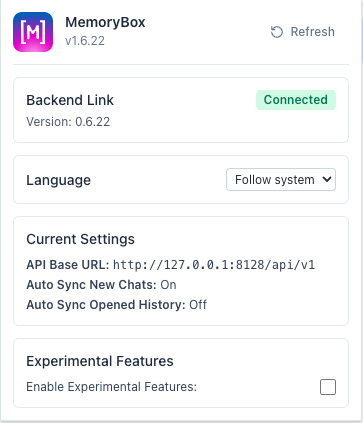
The default popup settings menu tracking connection integrity to the local desktop app.
Standard Settings Elements
- Backend Link Indicator: Displays a live connection status badge (e.g.,
Connected) alongside the operational extension version. - Language Dropdown: Adapts UI elements to your preferred locale (Follow system, English, or 简体中文).
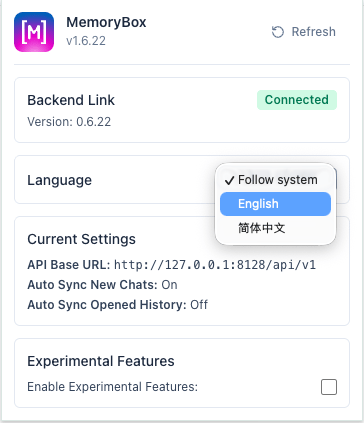
Modifying localization properties through the native interface language selector.
- Current Settings Overview: Displays a read-only telemetry block tracking operational parameters:
- API Base URL: The target network socket bridging data (
http://127.0.0.1:8128/api/v1). - Auto Sync New Chats Status: Reflects the active boolean condition toggle from your hover orb.
- Auto Sync Opened History Status: Reflects the historical ingestion state toggle.
- API Base URL: The target network socket bridging data (
🧪 Experimental Features
Checking Enable Experimental Features inside the extension tray unlocks specialized UI injections and control systems for early testing.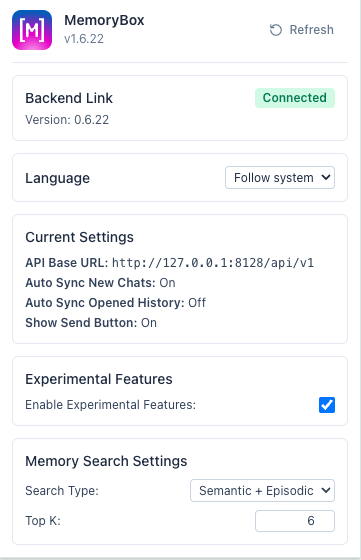
Activating experimental parameters inside the configuration drawer.
Advanced Orb Toggles
Activating this mode modifies your floating workspace environment. Clicking the browser hover orb expands the control interface to surface advanced parameters: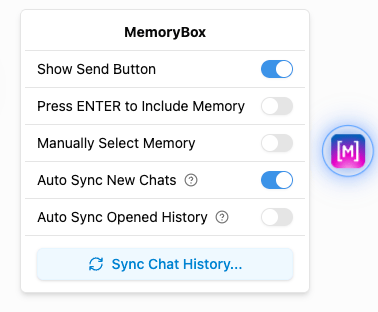
The advanced tracking orb popover layout revealing extended experimental toggle configurations.
- Show Send Button (PaperPlane Icon): Appends a manual submission icon alongside the input text field on ChatGPT and Gemini to manage prompt stream routing parameters.
- Press ENTER to Include Memory: Adjusts form submission settings, loading localized historical contexts instantly with standard keyboard shortcuts.
- Manually Select Memory: Bypasses automatic algorithmic ingestion heuristics, letting you curate individual inputs row by row.
🎞️ The Inline Session Library
When experimental features are active, the extension mounts a native Session Library panel directly beneath the primary message input field across supported platforms (ChatGPT, Gemini, Google AI, DeepSeek, and Doubao). This inline widget lets you query and reference your local database assets directly within the browser window.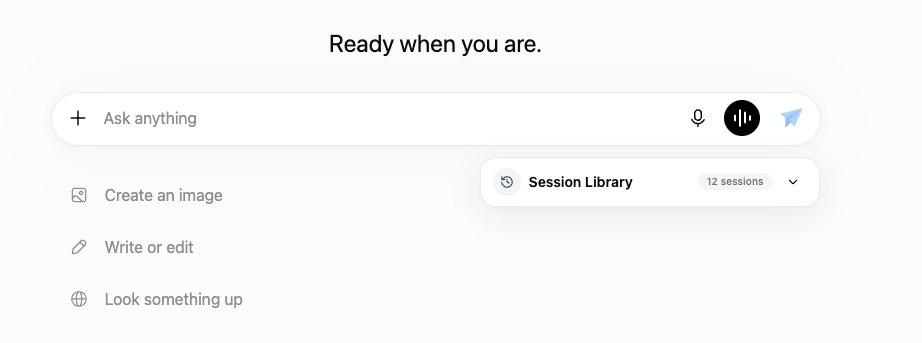
The default collapsed view of the inline browser Session Library injected underneath the main prompt input.
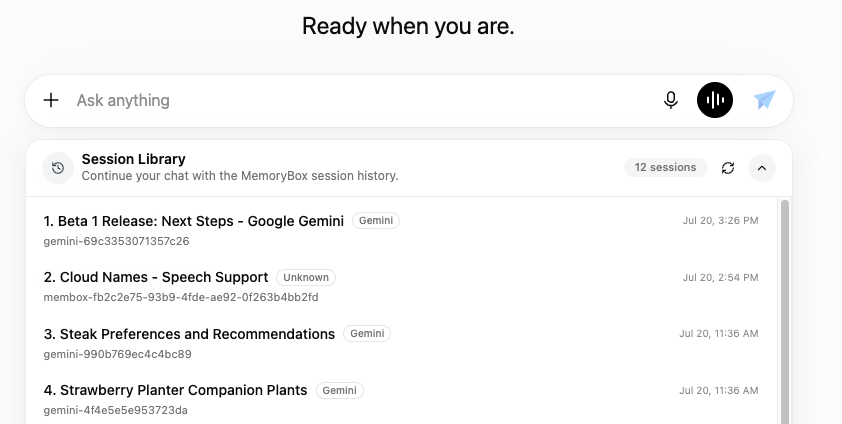
The expanded Session Library view showcasing indexed history sessions, space assignments, and unique memory IDs.
Session Item Architecture
Context/Title Summary
Context/Title Summary
Historical Timestamp
Historical Timestamp
Unique Memory ID
Unique Memory ID
membox-83cb3ee1...) for local directory mapping.Panel Controls
Panel Controls