

Navigating by Subject
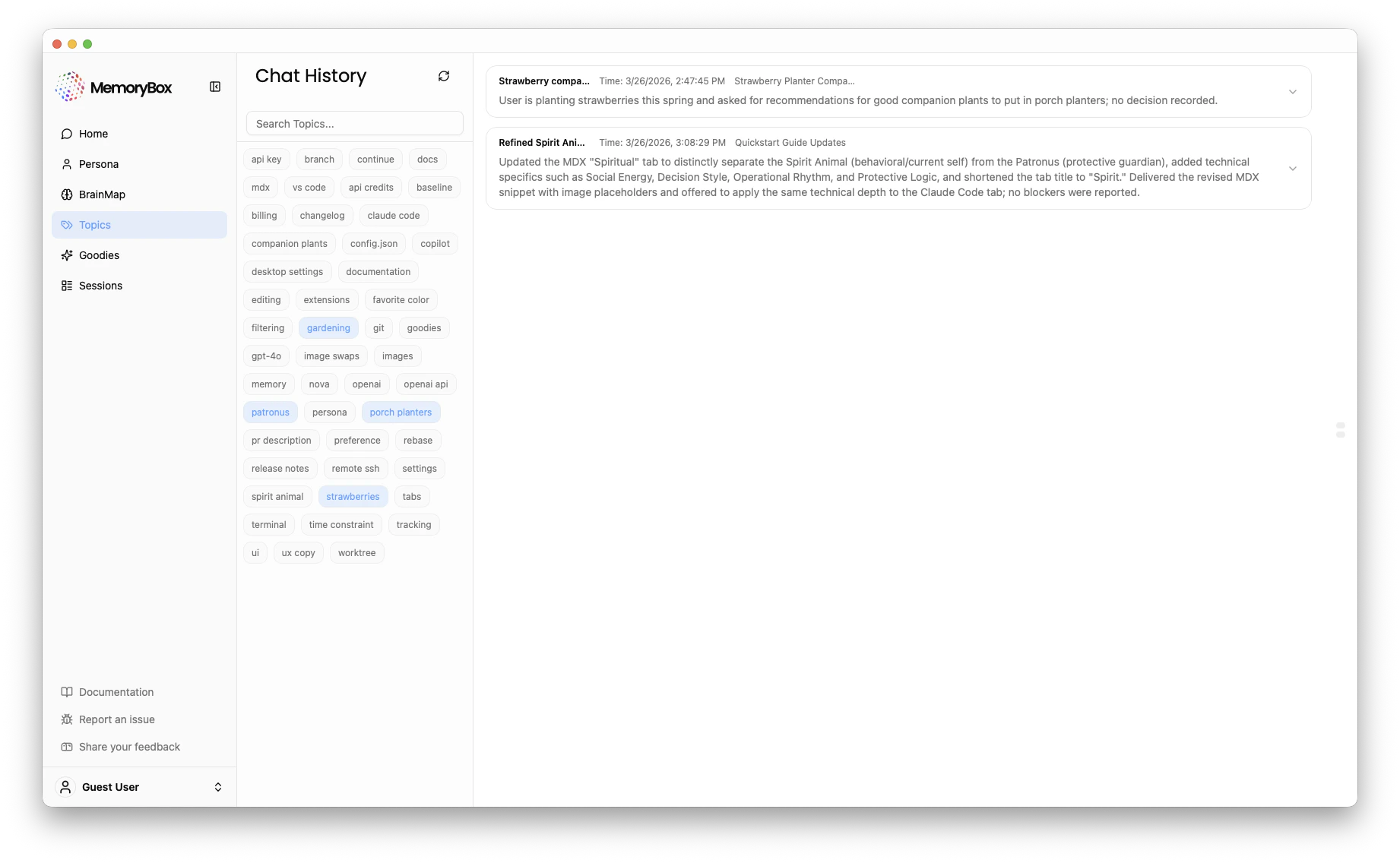
The Topics interface is designed around a tag-based “word cloud,” allowing for quick exploration of your distinct conversational areas.1. The Tag Cloud
The left-hand pane displays an alphabetized list of every topic tag detected within your memory.- Selection: Clicking any tag (e.g.,
spirit animalorstrawberries) will update the list pane to display only the conversations that include that specific tag. - Active State: The currently selected tag(s) are highlighted in blue (e.g.,
patronusandgardeningare active in the image above).
2. Conversation Summary List
The main right-hand pane displays a chronological list of conversation “episodes” filtered by your active tags. Each list item provides a high-level overview:| Feature | Description |
|---|---|
| Topic Title | The AI-generated summary of the specific conversation thread (e.g., “Quickstart Guide Updates”). |
| Timestamp | The exact date and time the conversation was captured by the extension. |
| Description | A multi-line abstract summarizing the core content, technical details, or decisions made within that specific episode. |
Note on Descriptions: These descriptions are not direct chat transcripts. They are summarized abstractions generated by the MemoryBox LLM, making it easier to scan large amounts of history to find a specific past event.