

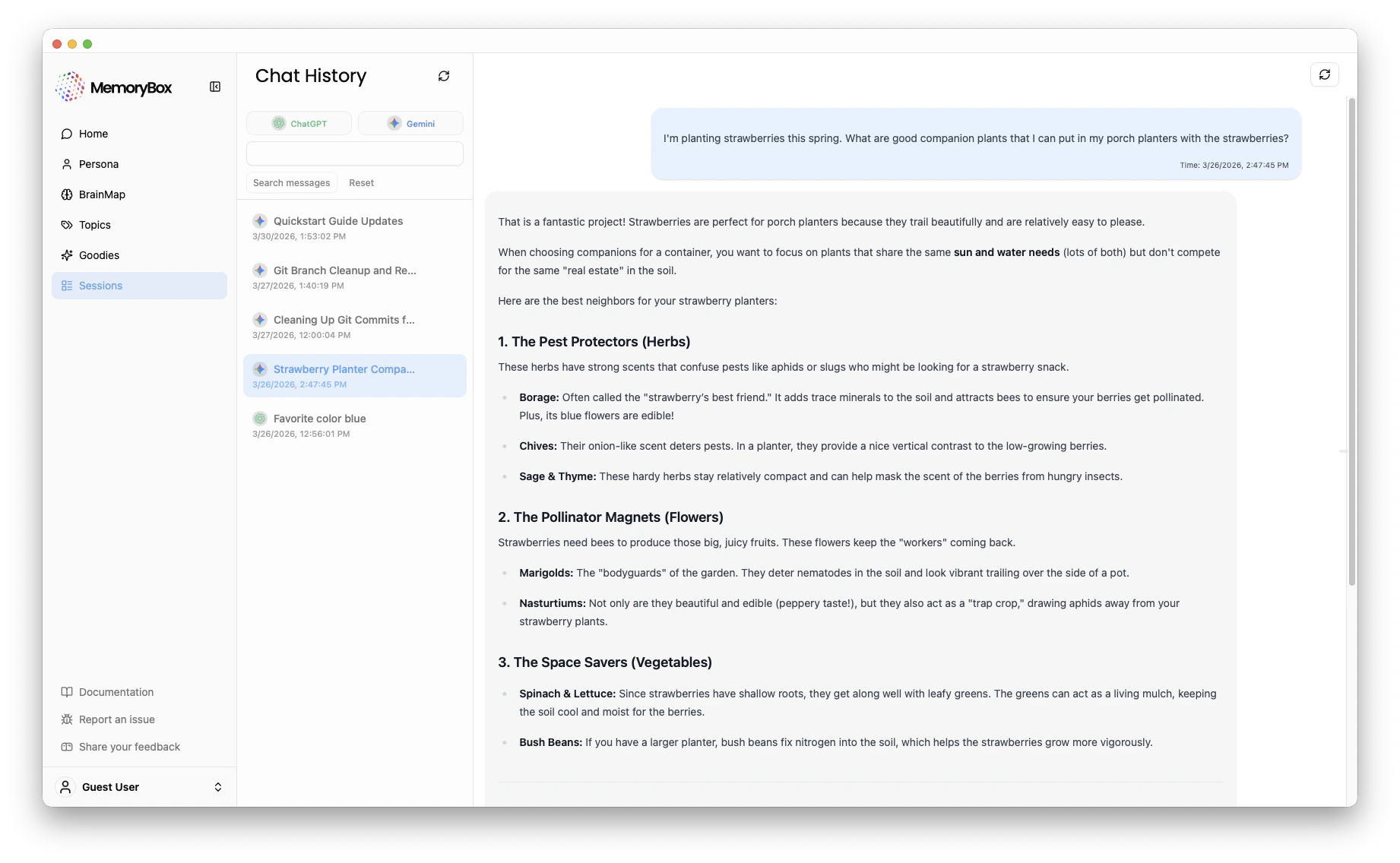
Navigation & Organization
The Sessions interface is designed for linear review of your conversational history, organized by the specific chat thread they originated from.1. Platform Filtering
Use the platform buttons (e.g., ChatGPT, Gemini) at the top of the sidebar to isolate history from a specific source. This is helpful if you use different AI assistants for distinct types of work.2. Search & Selection
- Search Messages: Use the search bar to find specific keywords within your chat history.
- Selection: Clicking a session from the left-hand sidebar loads the full transcript in the main audit window.
The Audit View
The main window displays the full transcript of your selected conversation, including both your prompts and the AI’s responses. This allows you to:- Message Verification: Each message includes a timestamp. This allows you to verify exactly when specific preferences or project details were recorded.
- Context Consistency: You can review how the AI utilized your existing memories to provide personalized responses within that specific thread.
Sync & Management
- Manual Refresh: Click the Refresh Icon (circular arrow) at the top of the sidebar to pull in the latest syncs from the browser extension.
- Search Context: If a conversation is missing, ensure that Auto-sync was enabled on the Assistant Orb during that session.
Privacy Note: Deleting a chat thread within the original AI platform (like ChatGPT) does not automatically delete it from your local MemoryBox archive.